
Help center › Stock and recipes
Stock and recipes
Defining ingredients, product recipes, purchases/waste, stock counts and low stock alerts.
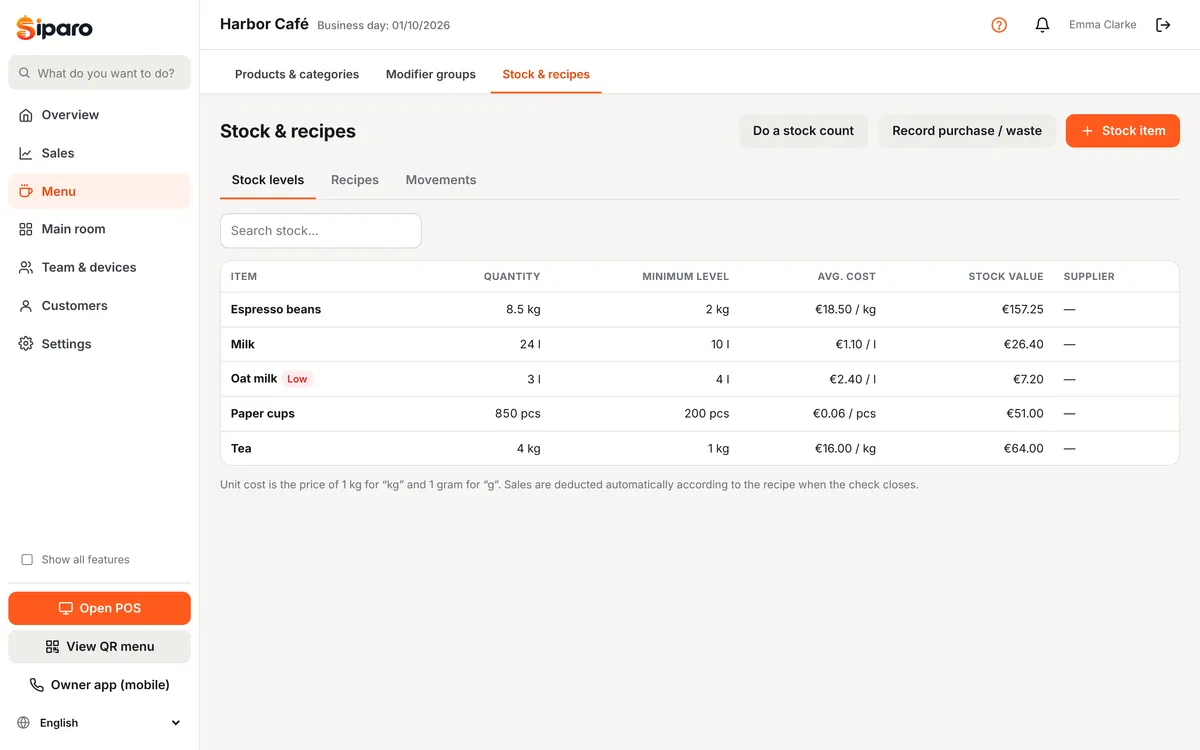
Dashboard → Menu → Stock & recipes (Business and Pro plans). For every product sold, the ingredients in its recipe are deducted from stock automatically.
Ingredients (stock items)
Use Add ingredient to enter a name, unit (pcs, g, kg, ml, l, portion), unit purchase price and low stock level. For "kg" the unit cost is the price of 1 kg; for "g" it is the price of 1 gram.
Recipes
In the Recipes tab, choose a product on the left and add the ingredients deducted when 1 unit is sold, with quantities (e.g. Latte: espresso beans 18 g, milk 200 ml). Recipe cost and its ratio to the sale price are calculated automatically.
Movements
With Record purchase / waste:
- Purchase: goods from a supplier (you can enter an invoice number / supplier). The average cost is updated.
- Waste: spoiled or spilled product.
- Adjustment: manual increase/decrease.
Sales are recorded when the check closes; refunds and reopened checks are recorded as reverse movements.
Stock count
Use Stock count to enter the actual quantities in storage. The difference from the system is recorded as a "count difference".
Low stock alert
When an item falls below its low stock level, it appears under "Low stock" on the dashboard overview, a notification is created and (if enabled) an email is sent.