
Help center › Reports and end of day
Reports and end of day
End of day (Z) and interim (X) reports, sales reports, till sessions, activity log and Excel export.
End of day (Z report)
End of day closes the business day, prints the Z report and archives it. The next day's sales go to a new business day. Services running past midnight don't mix up dates: the business day lasts until you run end of day.
- First close any open till sessions: at the POS, Menu (☰) → Cash management → Close till (count the drawer).
- Menu (☰) → End of day (Z). The day's summary appears: net sales, number of checks, discounts, comps, voids and payment breakdown.
- If checks are still open, close them or tick Carry open checks over to the next day.
- Press and hold: Run end of day — hold the button for one second.

Z reports are kept on Dashboard → Sales → End of day (Z) archive. For an interim report without closing the day, use Cash management → Print X report at the POS.
Reports page
Dashboard → Sales → Reports. Pick a range at the top (Today, Yesterday, This week, This month, 30 days, Last month or a date).
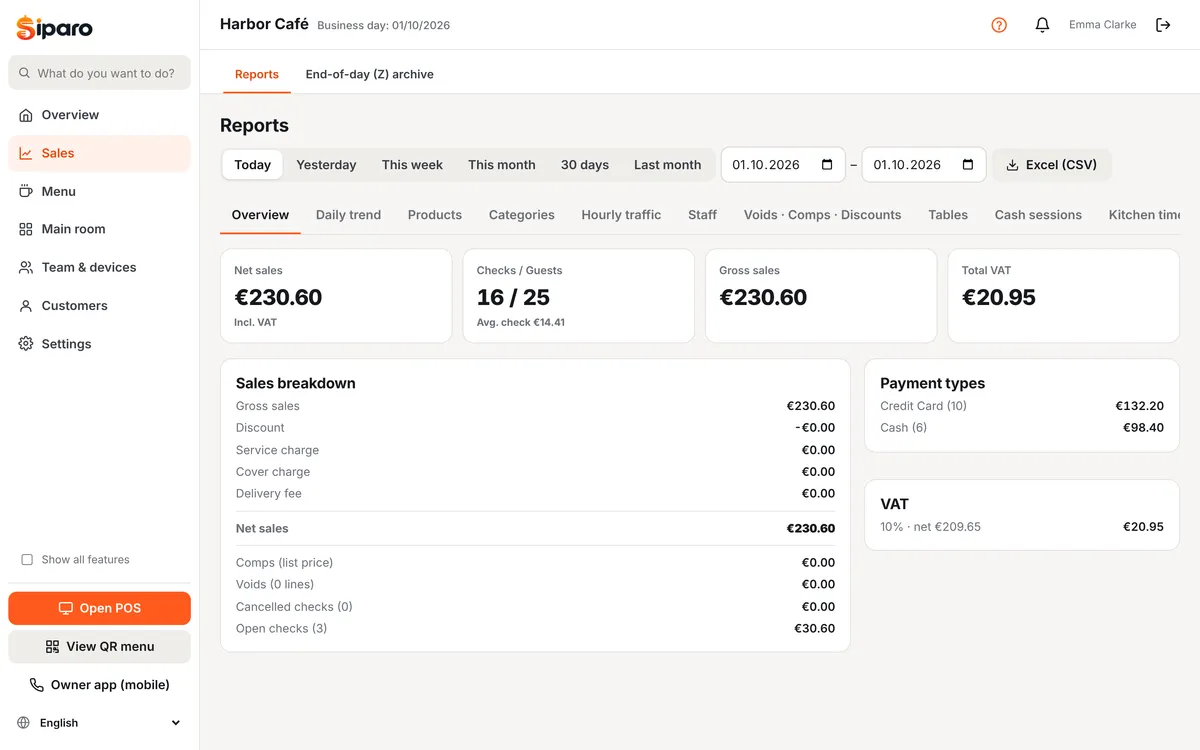
- Summary: gross and net sales, number of checks/guests, average check, service charge and cover.
- Payment types, categories, products (ranking by quantity, revenue and gross profit; ABC analysis).
- Staff: sales and checks per person.
- Hourly traffic and a day × hour heat map: for staff planning.
- Kitchen times: average preparation and seating time.
- Voids · Comps · Discounts detail and VAT breakdown.
- Till sessions: opening, expected, counted and difference.
Export any table with Excel (CSV) next to it. Detailed reports are on the Business and Pro plans.
Activity log
Dashboard → Sales → Activity log (visible when "Show all features" is ticked) lists voids, comps, discounts, check cancellations, payment refunds and reversals, price changes, table moves/merges, cash in/out and device pairing — with who did it, when, for what reason and the approving manager. Check it regularly to spot leakage and mistakes.
Daily email summary
If Settings → Email notifications is on, a summary email is sent when end of day is run; you also get alerts for high discounts/voids, till differences and low stock.